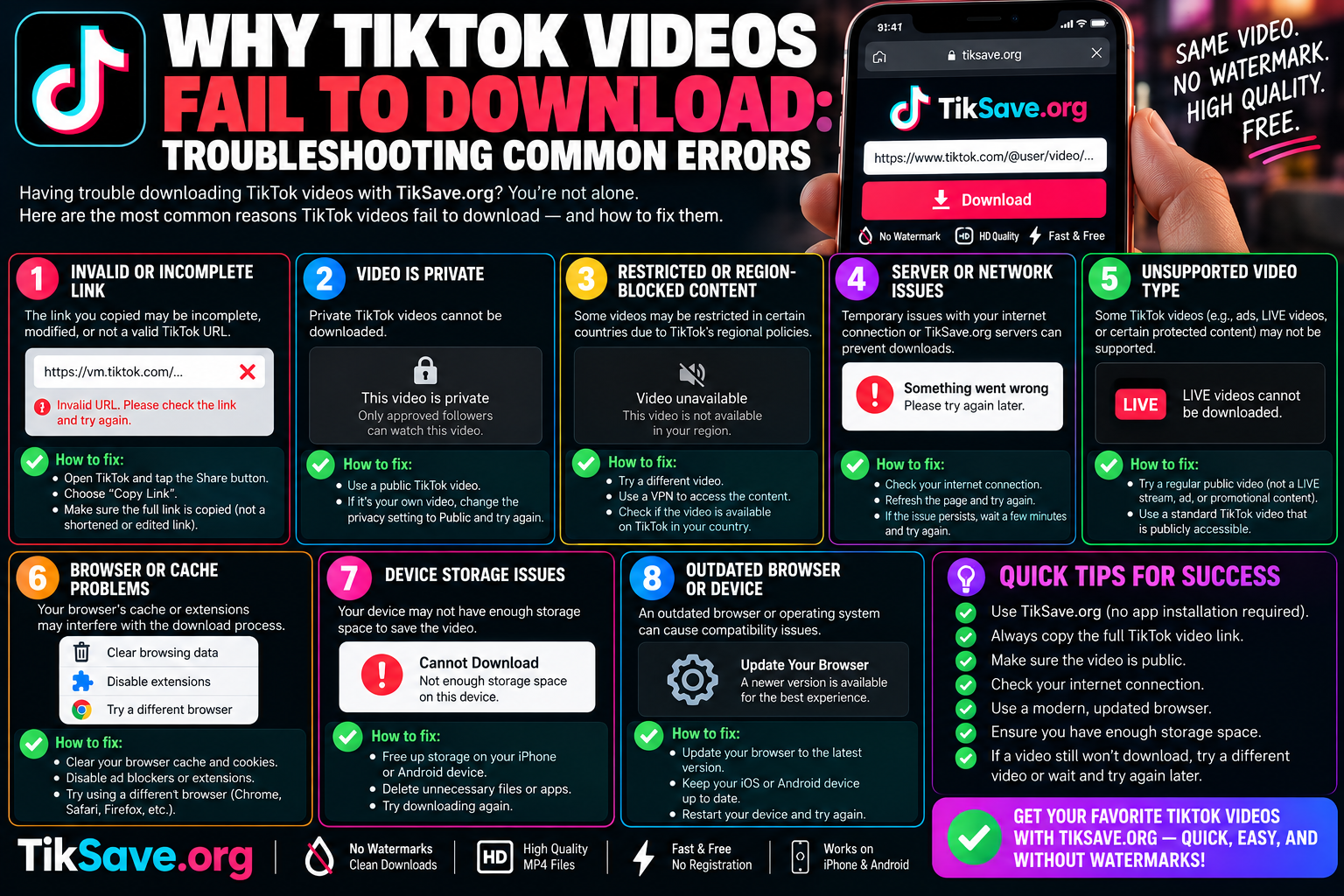
Why TikTok Videos Fail to Download: 5 Fixes
Running into download failures when trying to save a short-form clip can be frustrating, especially when you are attempting to archive a critical reference video or preserve your own creative work. You might encounter a grayed-out “Save Video” button, an error dialogue reading “Couldn’t save video,” or a third-party tool displaying an ambiguous “Invalid URL” alert.
Understanding why these issues happen requires peeling back how TikTok manages video permissions, content delivery networks (CDNs), and mobile file caching. Most download failures trace back to five distinct bottlenecks: privacy toggles, regional distribution blocks, app cache bloat, storage permissions, and URL structure changes.
1. Creator Privacy Settings and Account Permissions
The most common reason for a missing download button inside the TikTok app is intentional restriction by the content creator.
Under TikTok’s privacy settings, creators have explicit control over distribution:
-
Global Download Toggles: In Settings and Privacy $\rightarrow$ Privacy $\rightarrow$ Downloads, creators can switch off video downloads entirely. When disabled, the native “Save Video” option disappears from the share drawer for all viewers.
-
Account-Level Privacy: If an account is set to Private, only approved followers can view the content. Even if a user copies the share link, external services and unregistered browsers cannot access the backend video stream because the content requires active session authentication.
-
Age Restrictions and Minor Accounts: Under TikTok’s safety protocols, users under 16 have downloads turned off by default, and those settings cannot always be overridden.
Workaround: If you are trying to save your own content and discover downloads are blocked, ensure your own account allows downloads before publishing, or save your clips directly from your local camera roll before applying in-app edits.
2. In-App Cache Overload and Data Corruption
TikTok is heavily cache-reliant. The app aggressively preloads high-definition videos into temporary local storage to enable instant playback while scrolling through the For You Page (FYP). Over weeks of use, this temporary cache can easily grow past 2 GB to 5 GB, leading to unexpected memory conflicts and aborted downloads.
When your cache is bloated, initiating a new media download often causes the app to hang indefinitely at 0% or crash mid-export.
How to Clear TikTok App Cache
To resolve corrupted temporary data without losing your drafts:
-
Open TikTok and navigate to your Profile.
-
Tap the three-line hamburger menu in the top right corner and open Settings and Privacy.
-
Scroll down to the Cache & Cellular section and select Free up space.
-
Tap Clear next to Cache.
Note: Avoid clearing your “Downloads” or “Drafts” in this menu if you have local in-progress projects saved on your phone that you have not yet posted.
3. Storage Permissions and Mobile OS File Limits
Modern operating systems—specifically iOS 14+ and Android 13+—employ strict sandboxing models that prevent applications from writing files to your media gallery without explicit user authorization.
iOS Permission Issues
If you accidentally tapped “Don’t Allow” or “Selected Photos Only” when TikTok originally requested photo access, the operating system will silently block the app from saving completed MP4 files to your Camera Roll.
-
Go to your iPhone Settings.
-
Scroll down until you find TikTok.
-
Tap Photos and switch the permission level to Full Access.
Android Storage Management
Android devices handle media through system storage APIs. If your device storage falls below roughly 500 MB of free space, the OS will automatically reject write operations from background downloaders to protect basic system stability.
-
Check Settings $\rightarrow$ Storage and ensure you have at least 1–2 GB of headroom.
-
If using an external web downloader via Chrome or Firefox, ensure your browser has permission to write files to the
Downloadfolder.
4. URL Structure Variations and Dynamic Share Links
If you are using a web-based extraction tool like tiksave.org and receive an “Invalid Link” or “Failed to Fetch Video” alert, the problem almost always stems from the structure of the copied URL.
TikTok uses multiple link formats across its ecosystems:
| URL Type | Example Format | Reliability |
| Direct Desktop URL | [https://www.tiktok.com/@username/video/7123456789012345678](https://www.tiktok.com/@username/video/7123456789012345678) |
Highest compatibility across web tools |
| Mobile Short Link | [https://vm.tiktok.com/ZMxxxxxx/](https://vm.tiktok.com/ZMxxxxxx/) or [https://vt.tiktok.com/xxxxxx/](https://vt.tiktok.com/xxxxxx/) |
Requires HTTP redirect resolution |
| Photo / Slide Post | [https://www.tiktok.com/@username/photo/7123456789012345678](https://www.tiktok.com/@username/photo/7123456789012345678) |
Fails on video-only download parsers |
When using a mobile device, tapping “Copy Link” frequently generates a short redirection link (vm.tiktok.com or vt.tiktok.com). If an online downloader has not resolved the HTTP 301/302 redirection headers to obtain the underlying standard video ID, parsing will fail.
Quick Fix: Paste the short link directly into a mobile browser first, allow it to redirect to the full canonical URL ([tiktok.com/@user/video/](https://tiktok.com/@user/video/)...), and then copy that expanded address into the downloader.
5. Regional Restrictions and Content Removal
Occasionally, a video fails to download because it is no longer available on TikTok’s Content Delivery Network (CDN):
-
Mid-Review Removal: If a video gets reported or flagged by automated moderation systems, it is temporarily pulled from public distribution while placed under review. During this window, cached previews may still display in your feed, but downloading the underlying asset will fail.
-
Audio Licensing Takedowns: When a commercial record label issues a copyright strike against a sound, TikTok strips or mutes the audio track. Some download pipelines will reject media processing altogether if the audio and video streams cannot be merged properly.
-
Geo-Blocking: Certain creators restrict their content availability to specific geographic regions. If an online extraction server is located in a country where the content is regionally restricted, the server cannot read the media stream without proxy routing.
Troubleshooting Checklist
Before trying again, run through this quick diagnosis:
-
Verify the Link: Open the copied URL in an incognito/private browser tab. If it asks you to log in to see a private post, third-party downloaders cannot process it.
-
Switch Connection: Switch from public Wi-Fi to mobile data (or vice-versa). Many corporate, school, and public Wi-Fi networks block social media video CDNs.
-
Use the Full Video Link: Avoid truncated URLs and check whether the post is a multi-image carousel rather than a video.
-
Restart the Application: Completely swipe away TikTok and your mobile browser to reset memory pools.
Frequently Asked Questions
Why does my download get stuck at 100% on TikTok?
This typically occurs when the video has finished downloading from the server, but your phone’s operating system has blocked TikTok from moving the temporary file into your permanent camera roll due to restricted storage permissions.
Can I download a video from an account that blocked me?
No. When an account blocks you, TikTok’s API prevents your user session from accessing the video URL, metadata, or media streams associated with that profile.
Why do some third-party downloaders say “Video is Private or Deleted”?
This happens when the creator set their profile to private, deleted the video after you opened it, or set the audience targeting to exclude the geographic IP address of the processing server.