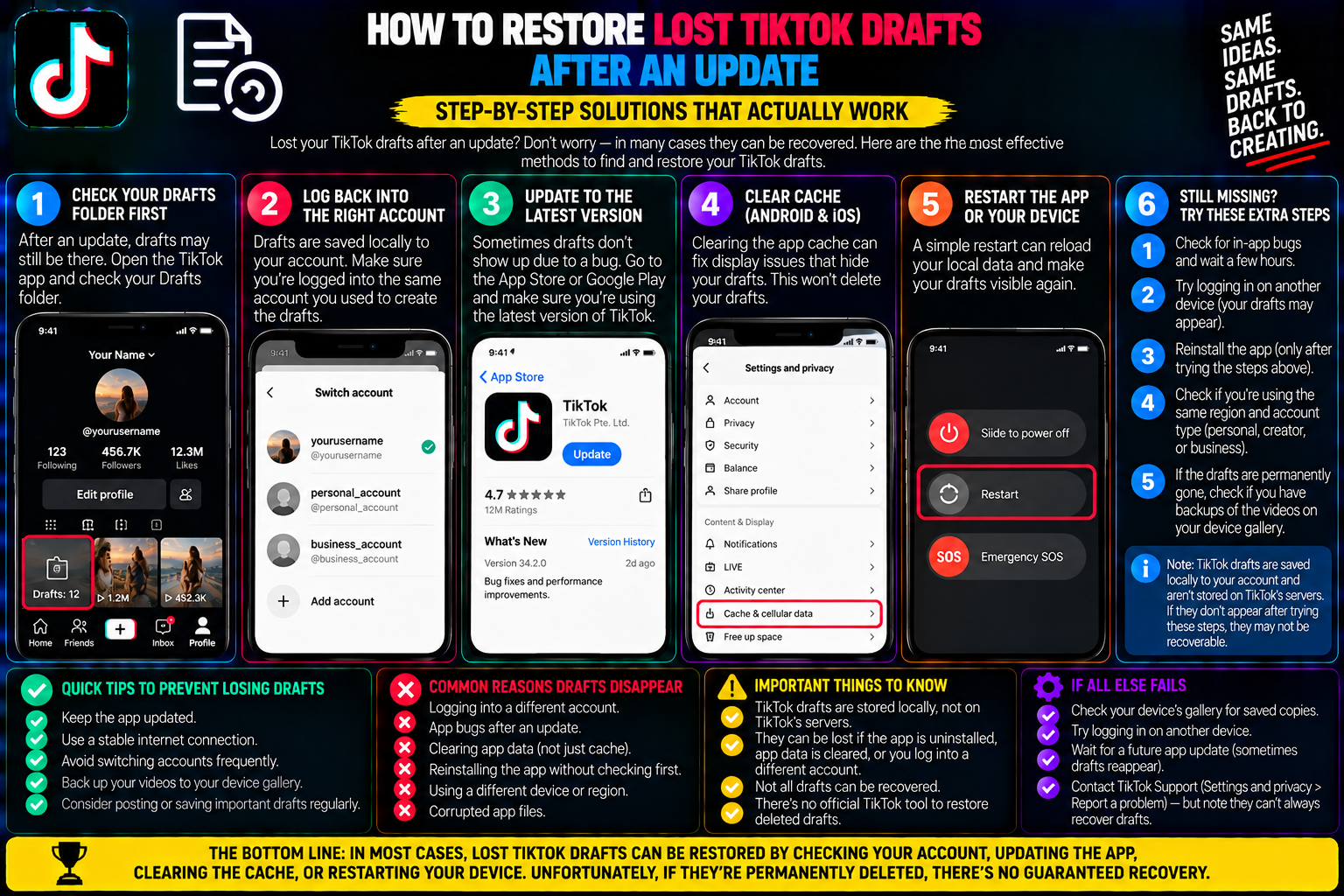
Restore Lost TikTok Drafts: Cache & Cloud Recovery
You open the App Store or Google Play Store, let your phone update TikTok to the latest version, and launch the app expecting new filters or interface tweaks.
You tap your profile icon to open your drafts folder the place where you keep your unposted video clips, lip-sync recordings, and multi-day editing projects.
The folder is completely gone.
Or worse, the drafts tile is still there, but opening it reveals an empty gray screen with zero saved projects.
Weeks of creative work, precise video transitions, and spontaneous takes seem to have vanished overnight.
Before you panic or start re-recording your entire backlog from scratch, take a breath. While TikTok handles drafts differently than published videos, an app update does not always delete your files permanently. Often, the update simply breaks the index link between the new app version and your phone’s local storage directory.
Understanding where TikTok drafts live on iOS and Android—and walking through targeted cache checks, cloud backup restorations, and system file recoveries—will give you the best chance of retrieving your lost content.
1. Where Do TikTok Drafts Actually Live?
To recover a missing draft, you must first understand the fundamental technical difference between published posts and saved drafts:
+-------------------------------------------------------------+
| PUBLISHED VIDEOS (Cloud Storage)                            |
| • Uploaded to ByteDance CDN servers                         |
| • Accessible from any phone, tablet, or web browser         |
| • Protected by account login credentials                    |
+-------------------------------------------------------------+
                             VS.
+-------------------------------------------------------------+
| TIKTOK DRAFTS (Local Device Storage Only)                   |
| • Stored strictly in your phone's private app sandbox       |
| • Never uploaded to TikTok's remote cloud servers           |
| • Bound to the physical hardware and local database file    |
+-------------------------------------------------------------+
When you tap “Save to drafts”, TikTok writes the video frames, audio cuts, and text coordinates directly into a private folder inside your smartphone’s flash storage.
Because video drafts take up significant storage, TikTok does not back them up to company servers.
If you log into your TikTok account on a friend’s phone or a secondary tablet, your drafts will not appear there. They exist solely on the device used to record them.
When an app update occurs, the operating system attempts to replace the app executable code while preserving the “Documents and Data” sandbox.
If the update encounters a file permission glitch, a database migration error, or an interrupted download, the new build may fail to read the old drafts index.
2. Step 1: Rule Out the Simple UI Glitches
Before trying technical recovery methods, eliminate common interface bugs that cause drafts to temporarily hide:
-
Verify the Active Account: App updates frequently sign users out or default to a secondary logged-in profile. Drafts are indexed to the specific Account ID that created them. Check your handle at the top of the profile tab to confirm you are on the correct account.
-
Force-Close and Relaunch: Swipe up from the bottom of your screen to open your phone’s app switcher, swipe TikTok away to close it completely, wait ten seconds, and open it again.
-
Restart Your Phone: A basic operating system reboot forces the phone’s file manager to refresh cached directory paths, which often resolves broken sandbox links after an update.
3. Method 1: The Native Device Gallery Check
Many creators forget that TikTok includes an automatic safety net: “Save to device”.
If this setting was toggled on during previous filming sessions, a rendered copy of your raw footage or final edit may be resting inside your phone’s native photo library:
+-------------------------------------------------------------+
| CHECKING NATIVE SYSTEM FOLDERS                              |
+-------------------------------------------------------------+
| iOS: Photos App -> Albums -> Scroll to "TikTok"             |
|      Also check: Albums -> Utilities -> "Recently Deleted"  |
+-------------------------------------------------------------+
| Android: Gallery / Google Photos -> Collections -> "TikTok"|
|      Also check: Google Photos -> Library -> "Trash" Bin    |
+-------------------------------------------------------------+
Open your default photo app and search specifically for a generated TikTok album.
Even if the in-app timeline edits (like animated text stickers) are missing, the foundational video clips and voice takes are often intact in your camera roll, allowing you to reassemble the video quickly.
4. Method 2: Restoring from Cloud Backups (iCloud & Google Drive)
If your drafts were cleared during a corrupted system update, the most reliable technical recovery route is restoring your phone from an automated device backup made prior to the update.
Because TikTok stores drafts in local application data, complete phone system backups automatically preserve those sandbox files.
For iPhone Users (iCloud Recovery)
If your iPhone runs automated nightly iCloud backups over Wi-Fi, your drafts folder from yesterday may still exist in the cloud:
Note: Restoring from a backup reverts your entire phone to that timestamp. Any new photos or text messages created after that backup should be saved off-device before proceeding.
For Android Users (Google One / Local File Backup)
On Android, device settings vary by manufacturer (Samsung, Google Pixel, OnePlus):
-
Open Settings $\rightarrow$ Google $\rightarrow$ Backup.
-
Check when your App data was last synced to Google Drive.
-
If an intact system snapshot exists, restoring device data via account setup will restore the application’s private app data folder, bringing back the local draft database files.
5. Critical Warning: What NEVER to Do When Drafts Disappear
When trying to fix missing drafts, many creators take actions that guarantee permanent file loss.
Avoid these three fatal mistakes:
-
DO NOT tap “Clear Data” or “Clear Storage” in Android Settings: As established in our storage architecture guide, clearing data resets the app sandbox, wiping all offline projects.
-
DO NOT trust sketchy “Draft Recovery” websites: Web pages claiming they can recover drafts by entering your TikTok username are scams. Drafts never hit TikTok’s servers, meaning no online service can pull them from the web.
6. How to Safeguard Future Drafts (The Bulletproof Vault)
The best way to deal with missing drafts is making sure you never rely solely on TikTok’s internal folder again.
+-------------------------------------------------------------+
| THE ZERO-LOSS DRAFT WORKFLOW                                |
+-------------------------------------------------------------+
| 1. Finish recording and editing your video in TikTok        |
| 2. Proceed to the final posting screen                     |
| 3. Set "Who can watch this video" -> "Only you" (Private)   |
| 4. Tap "Post" -> Video uploads securely to ByteDance CDN    |
| 5. Run private link through tiksave.org to archive 1080p MP4|
+-------------------------------------------------------------+
               RESULT: Video is safely preserved in the cloud,
               immune to app updates, crashes, or device loss.
By publishing your drafts privately under “Only you”, you push the finished video off your phone’s fragile local storage and onto TikTok’s permanent cloud servers.
Once stored privately:
-
App updates, cache purges, and device switches will never delete your work.
-
You can retrieve your clean source file at any time using tiksave.org to download the unwatermarked 1080p MP4 directly back to your camera roll or external hard drive.
Draft Recovery Methods at a Glance
| Recovery Method | Platform | Likelihood of Success | Complexity |
| Account / UI Check | iOS / Android | High (If simple glitch) | Instant |
| Camera Roll / Trash Bin | iOS / Android | Moderate (If auto-save was on) | Very Easy |
| System Cloud Backup | iOS / Android | High (If recent backup exists) | Advanced |
| Reinstalling the App | iOS / Android | 0% (Permanently wipes drafts) | Destructive |
Frequently Asked Questions
Can TikTok customer support restore my deleted drafts?
No. Because drafts are stored locally on your physical smartphone and never transmitted to TikTok’s data centers, TikTok’s support engineers have no technical means of accessing or restoring your draft files.
If I switch to a new phone, will my drafts transfer automatically?
No. Logging into your TikTok account on a new phone only syncs your published posts, direct messages, followers, and favorites. To move drafts to a new device, publish them privately under “Only you”, download them, and transfer the files over manually.
Why did an app update delete my drafts but keep my account logged in?
Operating system updates sometimes clear corrupted application cache and rebuild internal SQLite databases. If the drafts database table fails a validation check during the update migration, the app creates a fresh, blank drafts directory while preserving your account authentication tokens.