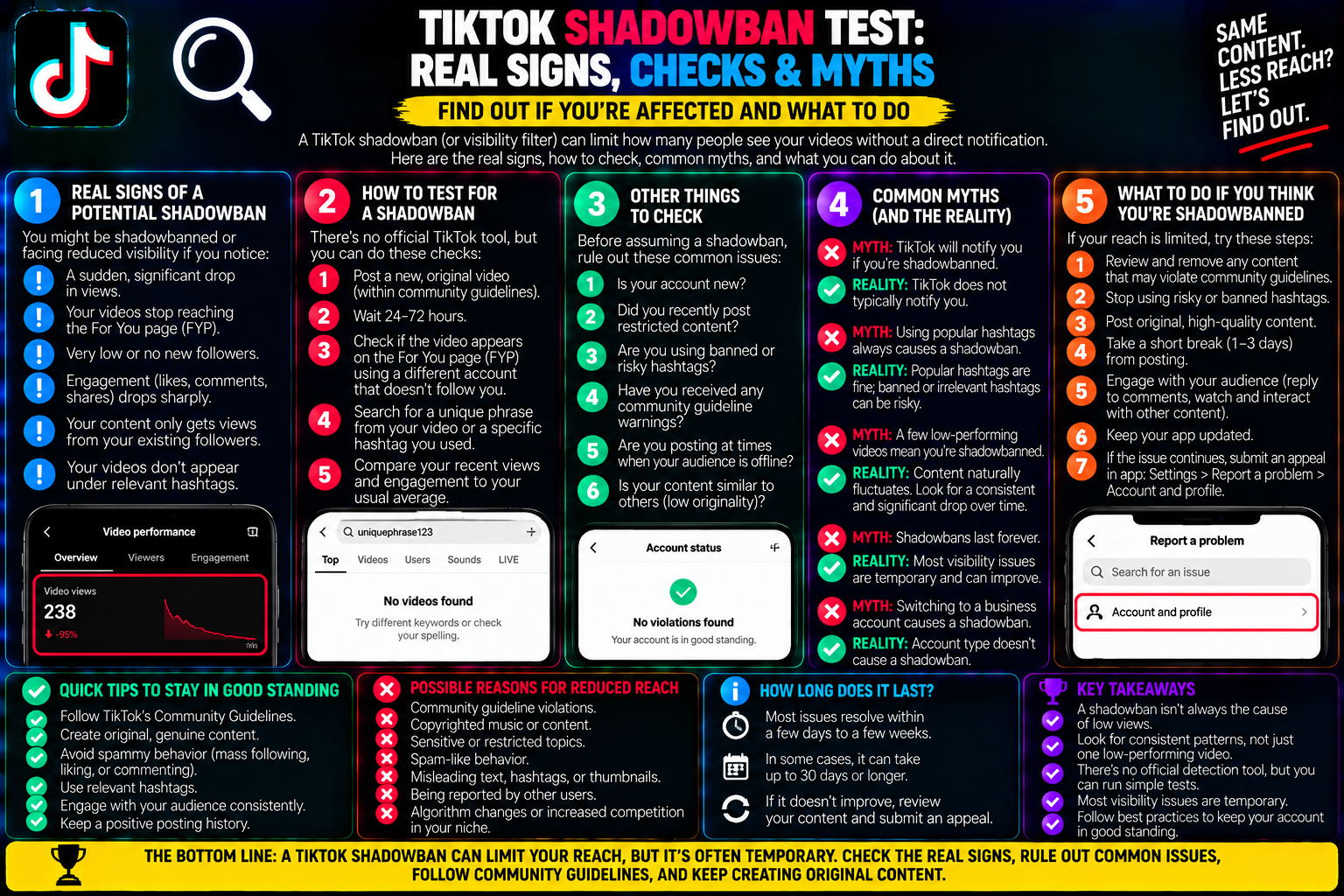
TikTok Shadowban Test: Real Signs, Checks & Myths
Your videos used to generate thousands of views within an hour. Your engagement notifications were steady, your follower count climbed daily, and your content regularly landed on the For You Page (FYP). TikTok shadowban test
Then, suddenly, the numbers fall off a cliff.
Your latest three uploads are trapped below 50 views. Comments disappear, your hashtag feeds seem unresponsive, and it feels as though you are broadcasting into an empty digital void.
The immediate conclusion for most creators is the dreaded TikTok shadowban.
The phrase “shadowban” is thrown around constantly in creator circles, often treated as an invisible, unfair curse delivered by an angry algorithm. But what is actually happening behind the scenes? Does TikTok secretly blacklist accounts, or did your latest video simply fail to retain viewer attention?
Distinguishing between an actual platform distribution penalty and a normal content slump—using real server diagnostics, traffic source metrics, and built-in audit tools—allows you to accurately troubleshoot your reach and restore algorithmic momentum.
1. What Is a TikTok Shadowban? (Platform Reality vs Myths)
Officially, TikTok does not use the term “shadowban”. In policy documentation and engineering whitepapers, the platform describes this mechanism as content distribution prioritization or eligibility restriction.
+-------------------------------------------------------------+
| CONTENT ELIGIBILITY TIERS ON TIKTOK                         |
+-------------------------------------------------------------+
| TIER 1: FULL FYP ELIGIBILITY (Healthy Account)              |
| Videos pushed to test batches on For You Page feed          |
+-------------------------------------------------------------+
                             │
                             ▼
| TIER 2: LIMITED DISTRIBUTION (Soft Algorithmic Flag)         |
| Post excluded from FYP; visible ONLY to Followers/Search   |
+-------------------------------------------------------------+
                             │
                             ▼
| TIER 3: ACCOUNT-LEVEL SUPPRESSION (True "Shadowban")        |
| Search auto-complete hidden, hashtags delisted, views = ~0  |
+-------------------------------------------------------------+
A shadowban is not a permanent deletion or an official account suspension. It is an automated safety intervention.
When automated trust-and-safety filters detect patterns resembling spam, repeated community guideline infractions, or copyright anomalies, the recommendation engine stops serving your media to new audiences.
Your profile remains open, you can still publish videos, and your current followers can view your clips if they manually visit your tab.
However, the algorithm halts outward discovery.
2. Real Diagnostics: 3 Data-Backed Tests to Prove Suppression
Instead of guessing based on gut feelings, run these three diagnostic tests to verify whether your account has suffered a distribution block:
+-------------------------------------------------------------+
| THE THREE-PHASE SHADOWBAN DIAGNOSTIC                        |
+-------------------------------------------------------------+
| TEST 1: Traffic Source Audit (Analytics % FYP)              |
| • Healthy: 70% - 95% For You Page                           |
| • Flagged: 0% - 5% For You Page (Profile/Followers only)    |
+-------------------------------------------------------------+
                             │
                             ▼
| TEST 2: The Unindexed Low-Volume Hashtag Search             |
| • Search custom tag from a logged-out private browser       |
| • Result: Video completely missing from "Recent" tab        |
+-------------------------------------------------------------+
                             │
                             ▼
| TEST 3: TikTok Studio "Account Check" Status                |
| • Review native safety report in TikTok Studio              |
| • Result: Identifies specific non-compliant strikes         |
+-------------------------------------------------------------+
Test 1: The Traffic Source Breakdown (The Most Reliable Indicator)
Wait 24 to 48 hours after uploading your video, then check its analytical origin:
-
Open the video and tap More data (or navigate to TikTok Studio $\rightarrow$ Analytics $\rightarrow$ Content).
-
Scroll to the Traffic source types panel.
-
On a healthy, compliant video, the “For You” stream typically accounts for 70% to 95% of your total impressions.
-
If your analytics display 0% For You—with 90%+ attributed strictly to “Personal profile” or “Following”—the video was systematically flagged as ineligible for recommendation.
Test 2: The Isolated Hashtag Query Test
This test checks whether your account’s public index entries have been temporarily masked:
-
Upload a short 10-second test video containing a rare, hyper-specific tag that has no existing competition (e.g.,
#testauditfollowed by six random digits). -
Wait 30 minutes for CDN ingestion.
-
Log out of TikTok or borrow a friend’s phone who does not follow your account.
-
Search for that exact hashtag and tap the Recent or Top tab.
-
If your video is nowhere to be found, your account’s discovery index is actively suppressed. If it appears cleanly, your account is indexed normally.
Test 3: The Native TikTok Studio “Account Check”
TikTok provides a native account diagnostics tool inside the mobile app:
-
Under the tools section, locate and tap Account check (or Account status).
-
The app runs an immediate automated audit across your profile standing, displaying whether your account has active community guideline strikes or feature locks.
3. Why It Happens: The Top Triggers for Reach Penalties
If your diagnostics confirm that your reach is restricted, it usually traces back to specific behavioral or content patterns:
| Trigger Category | Specific User Behavior | How the Algorithm Responds |
| Recycled Content | Re-uploading watermarked clips from Instagram or YouTube Shorts | Deprioritizes video as non-original / low-value content. |
| Spam Velocity | Uploading 6+ videos in an hour or mass follow/unfollow cycles | Restricts distribution to mitigate automated bot activity. |
| Borderline Guidelines | Minor policy boundary pushes (bikinis, extreme stunts, coarse audio) | Removes video from FYP eligibility while leaving it on profile. |
| Spammy Hashtags | Stuffing 25+ generic tags like #fyp, #viral, #foryou |
Reduces post discovery due to automated tag spam detection. |
| VPN / Rapid IP Shifts | Constantly switching VPN locations during upload | Flags session for unusual login behavior and fraud prevention. |
4. Debunking Common Shadowban Myths
Misinformation around algorithmic penalties leads creators to take destructive actions with their accounts:
Myth 1: “Third-party shadowban checker websites can test your account.”
-
The Reality: Websites that claim to check your shadowban status for a fee or email signup are inaccurate. No third-party tool has direct API access to ByteDance’s internal distribution queues. They simply scrape public follower counters and guess based on view drops.
Myth 2: “You should mass-delete all your low-view videos.”
-
The Reality: Mass-deleting 15 videos in ten minutes is a major mistake. The anti-spam engine interprets sudden mass deletions as an attempt to hide evidence of system abuse. If you need to hide poorly performing content, use Privacy settings to set them to “Only me” rather than deleting them.
Myth 3: “Paying for TikTok Promote will cure a shadowban.”
-
The Reality: Running paid advertising on a restricted account only promotes that specific paid post. It does not reset your organic trust score.
5. The Step-by-Step Recovery Protocol
If your analytics show 0% FYP traffic across multiple posts, follow this systematic reset sequence:
Once published, wait 24 hours and re-check your Traffic source types.
In most cases, the FYP percentage will rebound to normal levels, confirming that your algorithmic trust score has been restored.
6. Content Flop vs. True Shadowban: Quick Reference
Before assuming the worst, check your baseline engagement metrics. Often, poor reach simply means the first test audience did not engage with your opening hook.
| Diagnostic Metric | Normal Content Flop | Confirmed Shadowban / Suppression |
| For You Page Traffic | 40% – 85% (Just fewer total views) | 0% – 5% across multiple posts |
| Search Visibility | Profile & videos appear in search results | Name and videos missing from public search |
| Follower Feed Reach | Normal engagement from existing followers | Even active followers stop seeing updates |
| Primary Root Cause | Weak hook, low watch time, low shares | Automated policy flag or spam detection |
Treating reach issues with clear analytics rather than panic ensures your account remains healthy, compliant, and ready for long-term growth.
Frequently Asked Questions
How long does a TikTok shadowban typically last?
Most automated algorithmic restrictions last between 7 and 14 days, provided you do not continue posting flagged material or trigger further spam warnings. More severe restrictions involving repeated community strikes can take up to two to three weeks to fully clear.
Can I get shadowbanned for using trending sounds?
No. Using verified sounds from TikTok’s official native audio library is completely safe and encouraged by the platform. Penalties typically occur when creators upload unauthorized, copyrighted audio tracks directly within their edited video files without proper licensing tags.
Does switching to a Pro or Business account fix a shadowban?
No. Account categories (Personal, Creator, or Business) do not bypass content moderation filters. In fact, Business accounts have stricter music licensing restrictions, meaning using popular commercial pop tracks on a Business profile can trigger immediate audio mutes or distribution blocks.