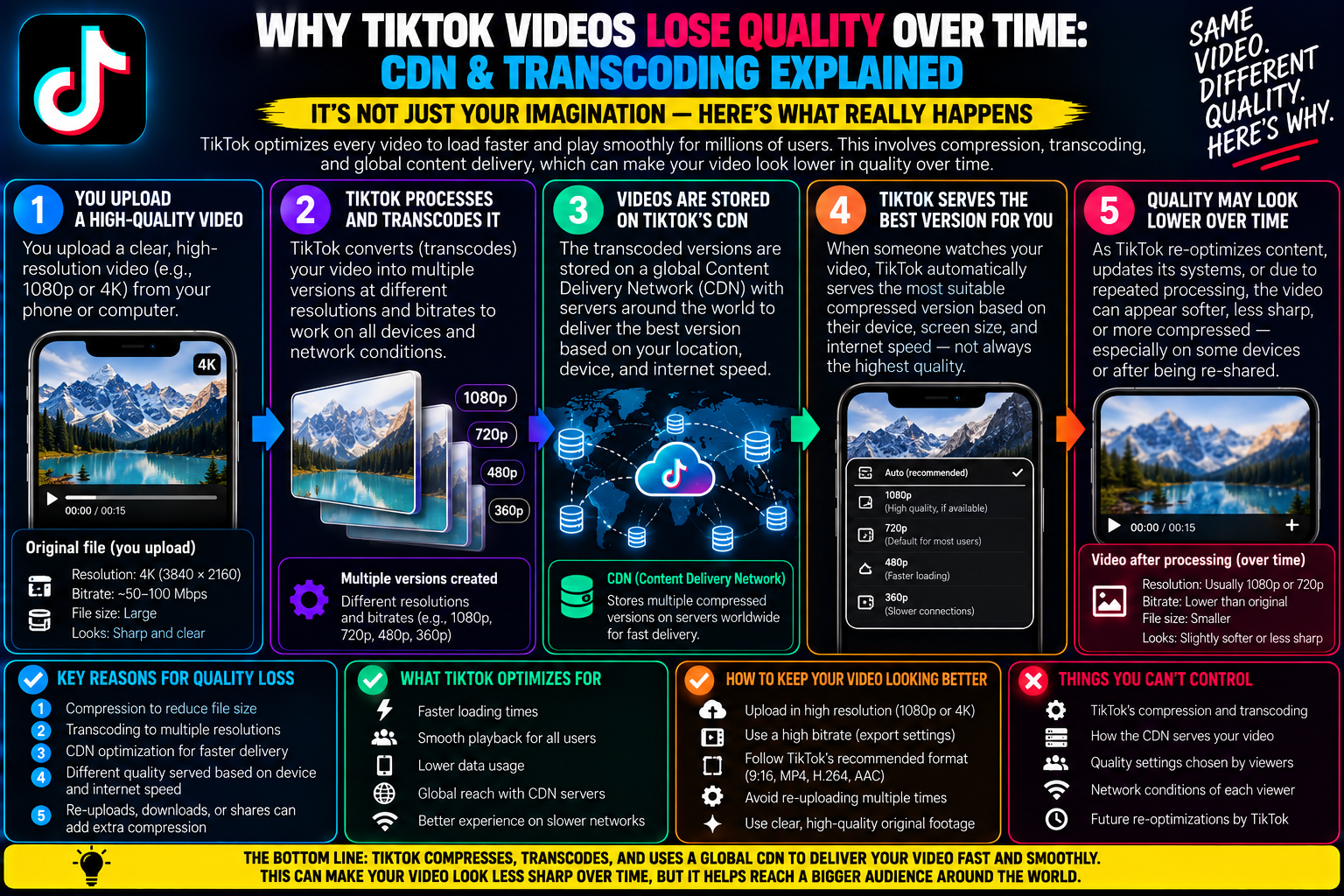
You open your TikTok profile to revisit a video you published six months ago. At the time of upload, you exported a pristine 1080p master file directly from your editing suite. During the first two weeks of its release, the video looked razor-sharp: text titles had clean boundaries, facial details were crisp, and camera motion panned without noticeable stutter. TikTok video quality loss over time
Now, as the video plays back on the same smartphone, something looks wrong.
Fine details have turned muddy. High-contrast edges buzz with visual artifacts, subtle background shadows display blocky color banding, and the entire video resembles a compressed 720p or 480p stream.
Your initial reaction might be to suspect an app bug, an outdated phone display setting, or a corrupted local cache.
However, your original master file didn’t change, and your smartphone didn’t lose its screen resolution.
Instead, your video was subjected to the hidden economics of global cloud media streaming: Content Delivery Network (CDN) tiering, adaptive bitrate ladder reprioritization, and cold storage transcode downgrades.
TikTok hosts petabytes of user-generated content across the planet. To keep delivery costs manageable and playback buffers instant, the platform actively alters how it serves your media as content ages and viewership cools down.
Understanding the technical lifecycle of an uploaded TikTok video helps explain why older posts degrade—and what you can do to preserve your original creative assets.
1. The High-Definition Lifecycle: Hot Storage vs. Cold Storage
To grasp why video quality decays over months, you have to look past your personal profile grid and examine how streaming platforms store media on cloud infrastructure.
When you upload a new video, it enters what cloud engineers call Hot Storage:
-
Hot Storage (Active Edge Nodes): For the first forty-eight hours to thirty days, your video is actively evaluated by the recommendation algorithm. It receives impressions on the For You Page, generates comments, and loops repeatedly. To ensure this video starts playing in less than two hundred milliseconds across multiple continents, TikTok caches high-bitrate, full-resolution 1080p streaming renditions directly on Edge CDN servers located close to major population centers.
-
Warm Storage (Declining Velocity): As daily view counts drop from thousands per hour to a handful per week, keeping heavy, uncompressed video chunks cached on expensive edge servers becomes financially wasteful. The CDN shifts the high-bitrate files back toward centralized data hubs, replacing them with lighter, more heavily compressed versions.
-
Cold Storage (Deep Archival): When a video hasn’t received significant organic traffic for months, the master high-bitrate streaming renditions are frequently moved to cold storage tiers. When a casual viewer scrolls back to that post on your profile grid, TikTok’s media player fetches a bare-minimum, low-bitrate transcode designed simply to play without stalling over cellular data.
Your video file isn’t physically decaying like old film stock; the platform’s delivery architecture is systematically serving a cheaper, lighter rendition to save bandwidth.
2. Adaptive Bitrate Ladders and Client-Side Throttling
TikTok does not deliver a single static video file to every viewer. When your video completes its initial ingestion pass, the platform’s encoding engines generate an Adaptive Bitrate (ABR) Ladder.
An ABR ladder is a bundle of different versions of your video sliced into tiny two-to-four-second segments at varying resolutions and bitrates:
-
Top Rung: 1080×1920 at ~3.5 Mbps to 4.5 Mbps (Served to high-speed Wi-Fi connections on modern devices)
-
Middle Rung: 720×1280 at ~1.8 Mbps to 2.2 Mbps (Served to standard 4G/5G mobile data)
-
Bottom Rung: 540×960 or 480×854 at ~600 kbps to 900 kbps (Served to congested networks and budget hardware)
When an older video sits in cold storage, fetching the top 1080p rung from central servers requires a noticeable initial load delay.
Because TikTok prioritizes instant start time above all else—knowing that a user will swipe away if a video pauses for even a fraction of a second—the client player defaults to fetching the lower rungs of the ladder.
If the user only watches the first five seconds of that older clip, the player never bothers requesting the higher-quality chunks, leaving the playback looking permanently soft and pixelated.
3. Secondary Re-Compression Cycles (Transcode Cascades)
Another factor in image degradation is platform-wide infrastructure updates.
Social media platforms periodically revamp their internal video delivery stacks to support newer, more efficient compression formats. For example, a platform might transition from legacy AVC (H.264) delivery to modern AV1 or HEVC encoding to cut global data usage by thirty percent.
When these mass back-catalog optimizations occur:
-
Automated cloud workers run batch re-encoding jobs across older library media.
-
Because the server may not re-access your original, uncompressed source file from deep tape storage, it frequently compresses an already compressed intermediate file.
-
This triggers generation loss—a phenomenon similar to taking a photocopy of a photocopy. High-frequency textures like hair strands, fabric weaves, and small typography are blurred away, leaving muddy macroblocks in their place.
4. The “Data Saver” Trap on Your Own Device
Sometimes, the perceived quality loss isn’t on the server side at all—it’s quietly configured within your own mobile app settings.
TikTok includes an aggressive client-side bandwidth limiter called Data Saver.
If you previously turned on Data Saver while traveling or managing a limited cellular plan, the app remembers this state indefinitely.
Even when you are back home connected to high-speed fiber Wi-Fi, the app’s player may continue requesting medium- or low-tier streaming chunks to conserve data.
To verify this setting on your device:
-
Open the TikTok app and navigate to your Profile.
-
Tap the three-line menu (☰) in the upper-right corner and select Settings and privacy.
-
Scroll down to the Cache & Cellular header.
-
Tap Data Saver.
-
If the toggle is active, switch it OFF.
-
Force-close the app from your phone’s app switcher and relaunch it.
Disabling this limiter forces the app to request the highest available bitrate rung whenever your network speed allows it.
5. How to Preserve Your Creative Assets Long-Term
Recognizing that social media platforms are dynamic content distribution pipes—not permanent digital preservation archives—highlights why you should never rely on TikTok as the sole storage drive for your portfolio.
If you ever need to repurpose an old video for a brand sponsorship, submit a creative reel to a client, or cross-post past work to a new platform, grabbing the clip off your public profile months later will leave you with an inferior, downgraded copy.
Protect your body of work by following these archive rules:
-
Maintain a Local Master Vault: Always export your completed edits from CapCut, DaVinci Resolve, or Premiere Pro at a high master bitrate (12 Mbps to 20 Mbps, 1080p, H.264) and archive those files on a dedicated external SSD or a cloud drive like Google Drive or Dropbox.
-
Keep Clean, Unbranded Copies: Avoid archiving videos using TikTok’s built-in “Save video” button, which permanently bakes in bouncing watermarks and re-compresses the file a second time.
-
Audit High-Value Posts Regularly: If you have signature videos that consistently bring in new followers or act as evergreen tutorials, monitor their visual quality. If an older post has degraded significantly due to cold-storage reprioritization, consider filming an updated, refreshed version with modern production standards to capture fresh algorithmic reach.
Understanding the invisible cloud mechanics behind CDN caching and transcode downgrades removes the mystery of aging video posts. By keeping local, high-fidelity master backups, you ensure your creative catalog retains its original sharpness long after the social platform deprioritizes older files.