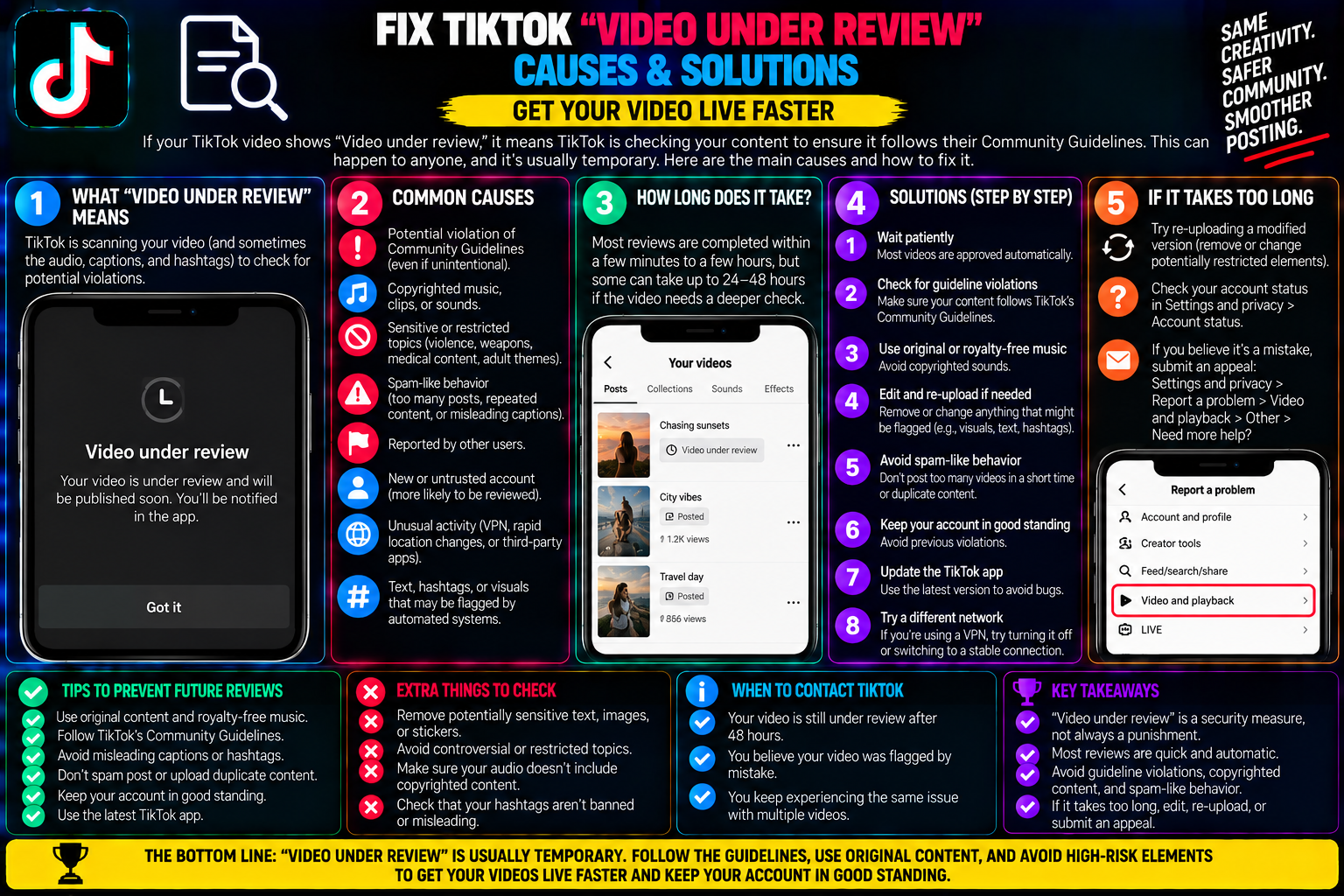
Fix TikTok “Video Under Review”: Causes & Solutions
You spend hours scripting, lighting, and cutting a high-energy clip. You add your hashtags, tap the red Post button, and wait for the initial burst of notifications.
Ten minutes pass. Zero views.
Thirty minutes pass. Still zero views.
You tap the share button on your own clip to send it to a friend, and an amber banner drops down from the top of the screen: “Video is being processed” or “Video under review.” If your friend opens your profile link, the post does not even exist on your public grid.
Seeing a post get frozen in review limbo is one of the most disheartening experiences on TikTok. The immediate instinct is to panic: Am I shadowbanned? Did someone mass-report my page? Should I delete the post immediately and try again?
The truth is that 95% of review holds are automated, routine system checks performed by ByteDance’s automated trust-and-safety filters.
Understanding how TikTok’s moderation pipeline inspects media, identifying the specific visual and audio triggers that flag automated reviews, and knowing how to handle stuck uploads without damaging your account reach will help you clear review delays cleanly.
1. Inside the Ingestion Engine: How TikTok Reviews New Content
Every minute, thousands of hours of video are uploaded to TikTok. Human moderators cannot manually preview every single clip before it hits the For You Page (FYP).
Instead, TikTok deploys a multi-stage automated moderation pipeline that inspects your file the moment the upload reaches 100%:
+-------------------------------------------------------------+
| TIKTOK AUTOMATED INGESTION & MODERATION PIPELINE            |
+-------------------------------------------------------------+
| 1. FILE UPLOAD COMPLETE (ByteDance Ingestion Node)          |
+-------------------------------------------------------------+
                             │
                             ▼
| 2. REAL-TIME AI FILTER SCAN (Computer Vision & Audio OCR)   |
| • Frame-by-frame optical recognition (NSFW, weapons, gore)  |
| • Automated Speech Recognition (ASR) scans voiceover track  |
| • On-screen text & hashtag parser checks prohibited phrases |
+-------------------------------------------------------------+
                             │
            ┌────────────────┴────────────────┐
            ▼                                 ▼
    [GREEN FLAG: Clean]               [YELLOW FLAG: Triggered]
    Instant public distribution       Pushed to "Video Under Review"
    Video hits test audiences         Deep AI pass or Human Moderator queue
The Difference Between Processing and Under Review
-
“Video Is Being Processed”: This is a purely technical bottleneck. It means TikTok’s servers are currently transcoding your heavy 1080p or 4K file into adaptive bitrate streaming formats for mobile networks.
-
“Video Under Review”: This is a content policy check. An automated script detected an element in your visual frames, spoken dialogue, on-screen text, or metadata that requires secondary algorithmic inspection or manual human sign-off before public distribution.
2. The 6 Most Common Triggers for “Video Under Review”
Automated moderation bots lack human nuance. They work on pattern-matching rules, which means innocent creative choices frequently trip alarms.
1. Spoken Audio Triggers (ASR Analysis)
TikTok’s speech-to-text bots transcribe your entire vocal track in seconds. If you pronounce trigger words—such as kill, blood, weapon, fight, scam, depression, or drug-related terms—the system automatically pauses distribution to verify the context (e.g., distinguishing between a true-crime educational review and real-world violence).
2. Optical Computer Vision Flags (False Visual Positives)
The visual engine scans every frame for skin-to-fabric ratios, rapid motion, and sharp objects:
-
Cooking Content: Chopping vegetables with a large kitchen chef’s knife can be misidentified as a weapon threat.
-
Fitness & Beach Vlogs: Bikinis, sports bras, or shirtless gym workouts can trip automated adult-content thresholds.
-
Skincare & Makeup Tutorials: Up-close application of red lip tint or peel-off face masks can falsely register as blood or bodily harm.
3. Rapid Deletion and Immediate Reposting
If you post a video, notice a typo, delete it in two minutes, and immediately upload the identical file again, TikTok’s anti-spam engine flags the action as potential bot-like duplicate flooding. The duplicate upload is almost always held in review for algorithmic fingerprint matching.
4. Direct External Links & Financial Claims
Captions containing aggressive commercial phrasing (“crypto,” “guaranteed returns,” “cash payout”) or encouraging users to exit the platform via unverified links will trigger review checks to guard against phishing campaigns.
5. Sudden Surges in Account Posting Frequency
If an account that normally posts once a week suddenly uploads four videos in forty minutes, the system places subsequent uploads into temporary holding queues to rule out account compromise or script-driven automation.
6. Copyrighted Music Fingerprint Conflicts
Uploading pre-edited videos with commercial music tracks baked into the file (rather than selecting the audio via TikTok’s native in-app sound library) causes the automated audio scanner to cross-reference global digital rights management (DRM) databases.
3. How Long Does a Review Last? (The Timeline Matrix)
| Review Stage | Typical Duration | What Is Happening Behind the Scenes | Action Required |
| Stage 1: Quick AI Scan | 5 – 20 Minutes | Automated second-pass audio and visual neural net re-evaluation | Do nothing. Wait patiently. |
| Stage 2: Extended Algorithmic Hold | 1 – 3 Hours | Server queue backup or multi-layer metadata cross-referencing | Verify community guidelines compliance. |
| Stage 3: Human Moderator Queue | 6 – 24 Hours | Ambiguous content escalated to physical moderation teams | Prepare an appeal if rejected. |
In the vast majority of cases, an automated review resolves itself within 15 to 45 minutes, after which the video is released directly onto the FYP without penalty.
4. What NOT to Do When a Video Is Stuck Under Review
When your view counter sits at zero, taking the wrong steps can hurt your account’s algorithmic standing.
-
DO NOT set the video to Private immediately: Changing the visibility toggle back and forth while moderation queues are reading the file can freeze the container database entry.
-
DO NOT upload the same video a second time: Having two identical files processing through moderation triggers duplicate-content spam filters on both uploads.
-
DO NOT spam edit requests: Leave the caption, covers, and tags untouched until the initial review status resolves.
5. Proven Steps to Clear or Handle a Stuck Review
If your video has been frozen at zero views for more than an hour, execute this recovery workflow:
6. How to Safeguard Future Uploads Against Review Flags
-
Use “Algor-Speak” for Sensitive Terms: Replace terms that trip automated filters with safe alternatives (e.g., use “unalive” instead of suicide, “mascara” or “le-mon” for sensitive context, or censor letters like d-ath).
-
Select Music In-App: Add your desired trending tracks directly through TikTok’s Add sound menu. Lower the volume of the in-app sound to 1% if you already have custom background audio, which satisfies the licensing handshake automatically.
-
Leave 2 Seconds of Visual Context: Avoid opening a video with abrupt, loud noises, jarring screen flashes, or extreme close-ups of bare skin, as the first 3 seconds face the heaviest automated image-recognition scrutiny.
Understanding that review periods are standard automated safety protocols takes the stress out of publishing. Giving the system time to clear its checks—and knowing how to cleanly repurpose frozen media—ensures your reach and channel momentum remain steady.
Frequently Asked Questions
Does being put under review mean my account is shadowbanned?
No. An isolated review hold is an automated inspection of a single video asset. A shadowban involves a prolonged, platform-wide suppression of your entire profile’s distribution across all videos. If your older posts are still gaining likes and views, your account is in good standing.
If my video clears review after 2 hours, will it still hit the FYP?
Yes. TikTok’s recommendation algorithm evaluates videos based on performance metrics (watch time, shares, completion rate) beginning the moment the video is pushed to its first batch of public test viewers, not the timestamp when you hit upload.
Can I submit an appeal while a video is still “Under Review”?
No. The appeal button only becomes available if the moderation review concludes with an active community guideline violation or a distribution strike. If the status is still “Under Review,” the file is actively processing and cannot be manually contested yet.