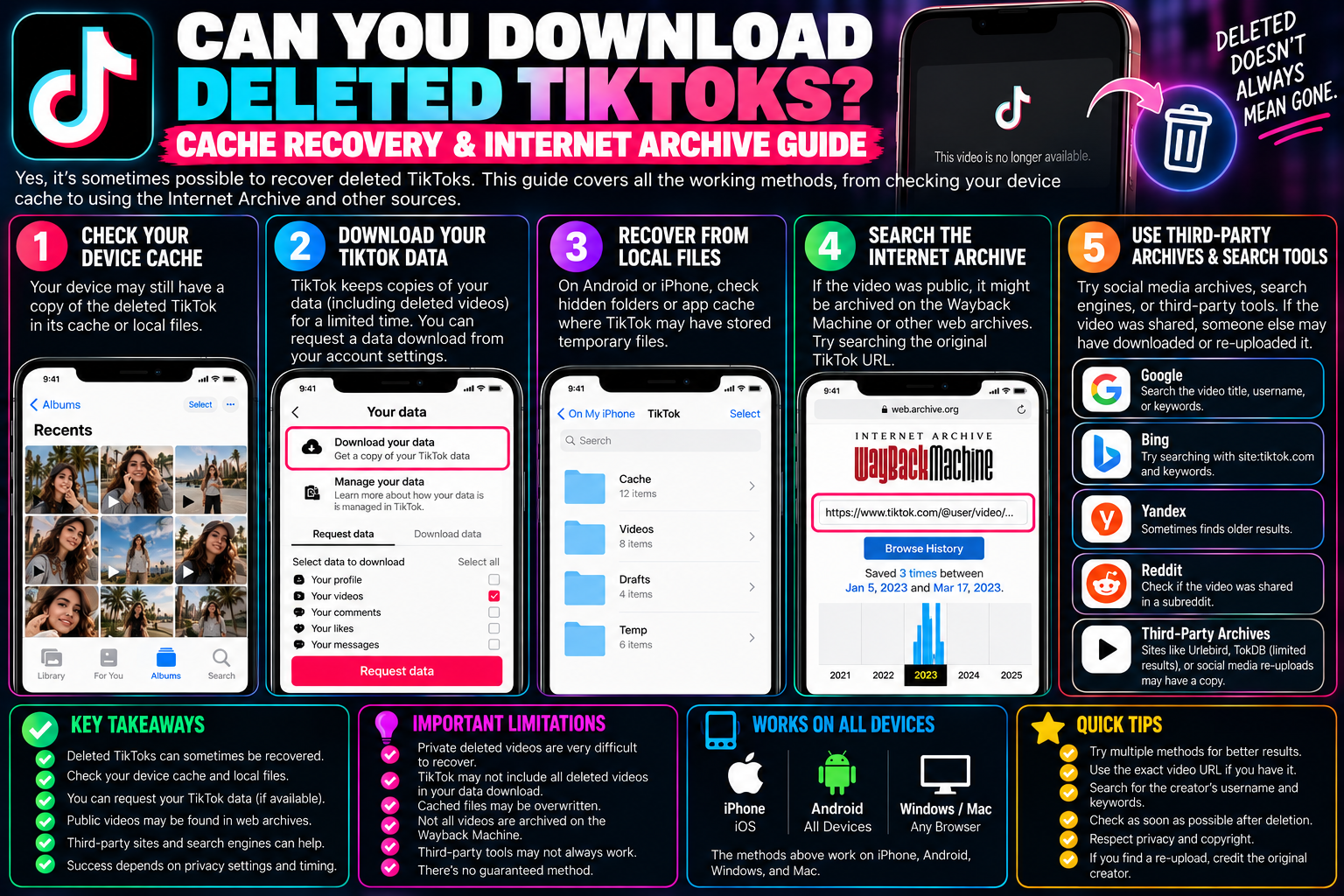
Can You Recover Deleted TikToks? Cache & Archive Guide
Few things are more frustrating than trying to track down a video you bookmarked or created, only to be met with a blank screen reading “Video currently unavailable” or “This post was removed.” Whether an author deleted a video in a clean-up spree, an account was suddenly suspended, or TikTok’s automated moderation flagged a clip by mistake, content vanishes from the platform every single day.
Once a video is deleted from TikTok, the official server endpoints cease to serve the media file. Standard web downloaders like tiksave.org rely on an active public link to fetch the high-definition media stream from TikTok’s Content Delivery Network (CDN). If the master post is gone, the direct URL returns an HTTP 404 error.
However, “deleted” on the web does not always mean gone forever. Depending on when the video was removed, whether you previously watched it, and whether digital preservation bots crawled it, several technical recovery channels exist.
1. Recovering Your Own Deleted Videos via Account Backup
If you are the original creator of the clip and accidentally deleted it from your profile, TikTok maintains temporary recovery logs that can occasionally give you access to your lost footage.
Checking the “Download Your Data” Archive
Even when a video disappears from your public profile grid, associated account telemetry remains stored in your personal data log for a short retention window:
-
Open TikTok and head to your Profile.
-
Tap the hamburger menu in the top-right corner and select Settings and privacy.
-
Navigate to Account $\rightarrow$ Download your data.
-
Request your data file in TXT or JSON format.
-
Once your archive is generated (usually 24–48 hours later), extract the
.ziparchive on a computer. -
Look for the file named
video_browsing_history.jsonorposts.json.
While TikTok often purges the raw video stream within days of deletion, the JSON log frequently contains the original backend CDN media link ([https://v16-webapp-prime.tiktokcdn.com/](https://v16-webapp-prime.tiktokcdn.com/)...). If the CDN cache has not performed a garbage-collection sweep yet, pasting that long URL directly into a desktop browser will let you save the raw MP4 file before it expires permanently.
2. Local Smartphone Cache Extraction (Android & iOS)
If you or someone else recently watched the deleted video on your phone, a full-resolution copy might still sit inside your device’s temporary app cache memory.
Method A: Android File System Excavation
Android apps store unencrypted temporary media in sandboxed app folders to prevent re-buffering clips on every scroll.
-
Do not clear your TikTok cache or run phone cleaner apps.
-
Download an advanced file explorer (like Solid Explorer or Files by Google).
-
Navigate to your internal storage directory:
Plaintext
Internal Storage/Android/data/com.zhiliaoapp.musically/cache/(Note: On newer Android versions, access to the
/Android/datafolder may require connecting your phone to a PC via USB cable). -
Open the subfolder named
videoorcache. -
You will see dozens of extensionless files with random alphanumeric names (e.g.,
f_0028a1). -
Sort the files by Date Modified (Most Recent).
-
Copy the largest files (anything between 2 MB and 30 MB) to your
Downloadfolder. -
Rename the file extension from blank to
.mp4(e.g., changef_0028a1torecovered_video.mp4). -
Open the file in your media player. If that video was cached during your recent scroll session, it will play back cleanly.
Method B: iOS Temporary Sandboxing
Because Apple’s iOS sandboxes app environments securely, you cannot browse direct system directory paths without jailbreaking. However, if you previously tapped “Add to Favorites” or watched the video while connected to a desktop Mac:
-
Inspect Safari or desktop browser caches if you viewed the post on a computer.
-
Search your local iPhone Photos album under Recently Deleted; many users forget that in-app drafts or prior camera-roll exports land there for 30 days before permanent deletion.
3. The Wayback Machine & Open Archival Systems
For high-profile creators, viral cultural moments, or news-worthy clips, public digital archivists often capture snapshots of TikTok pages before they are taken down.
Using the Internet Archive (Wayback Machine):
-
Locate the exact original URL of the deleted TikTok post (e.g.,
[https://www.tiktok.com/@username/video/7123456789012345678](https://www.tiktok.com/@username/video/7123456789012345678)). You can often find this link inside your browser history, text message threads, or bookmarks. -
Visit
web.archive.org. -
Paste the complete URL into the search bar and hit enter.
-
If the snapshot calendar shows blue circles on past dates, click the timestamp closest to the date the video was published.
-
If the Wayback crawler successfully archived the embedded video player asset, right-click the playing video and choose Save Video As… to download the MP4.
Checking Search Engine Web Caches
If a video was deleted within the last 24 to 48 hours:
-
Search Google or Bing for the exact TikTok URL enclosed in quotes:
"[tiktok.com/@username/video/123456789](https://tiktok.com/@username/video/123456789)". -
Tap the three dots next to the search result.
-
If available, click Cached.
-
While the player might not stream the video live, the cached metadata will reveal the exact caption, sound title, upload date, and transcript, making it much easier to track down reposts on other platforms.
4. Tracking Down Reposts Across Alternative Platforms
The nature of modern social media is heavy cross-pollination. When a TikTok video hits significant view counts, third-party accounts, bots, and fans frequently repost the content across secondary networks.
| Platform | Search Strategy | Best For |
| YouTube Shorts | Search creator’s handle + key phrases from the original caption | Finding high-definition re-uploads |
| Twitter / X | Search the video ID or creator handle + keyword filters | Uncensored viral clips and news commentary |
Check subreddits like r/TikTokCringe or niche hobby boards |
Finding community discussions with mirror links | |
| Instagram Reels | Search the creator’s secondary IG handle | Direct author backups and cross-posts |
If you locate a re-uploaded mirror on YouTube Shorts or Twitter, you can use specialized platform downloaders to pull the video file down for offline archiving.
Summary of Recovery Methods
| Recovery Channel | Success Rate | Technical Difficulty | Time Window |
| Local Android App Cache | High (if recently viewed) | Moderate (File management) | Hours to Days |
| TikTok Data Request | Moderate (Creator’s own clips) | Easy | Within ~7–14 days |
| Wayback Machine | Low to Moderate (Viral posts) | Easy | Indefinite (if crawled) |
| Cross-Platform Reposts | High (for popular clips) | Easy | Weeks to Months |
Frequently Asked Questions
Can TikTok support restore a video that I accidentally deleted?
No. TikTok’s support infrastructure is largely automated, and their terms outline that user-initiated deletions are treated as permanent removals from public production databases. Support representatives do not provide manual file restoration services.
Can online downloaders recover a video if I only have the link to the deleted post?
No. Online tools like tiksave.org require active server responses to extract media streams. If the master URL displays an error page on TikTok’s official site, external downloaders cannot retrieve the file because there is no active data feed to parse.
Why do some deleted TikToks still appear in my “Liked Videos” tab?
TikTok caches thumbnails and metadata client-side. The preview card may linger in your likes list until your device syncs fresh data with the server. Tapping the thumbnail will trigger the “Video unavailable” prompt.