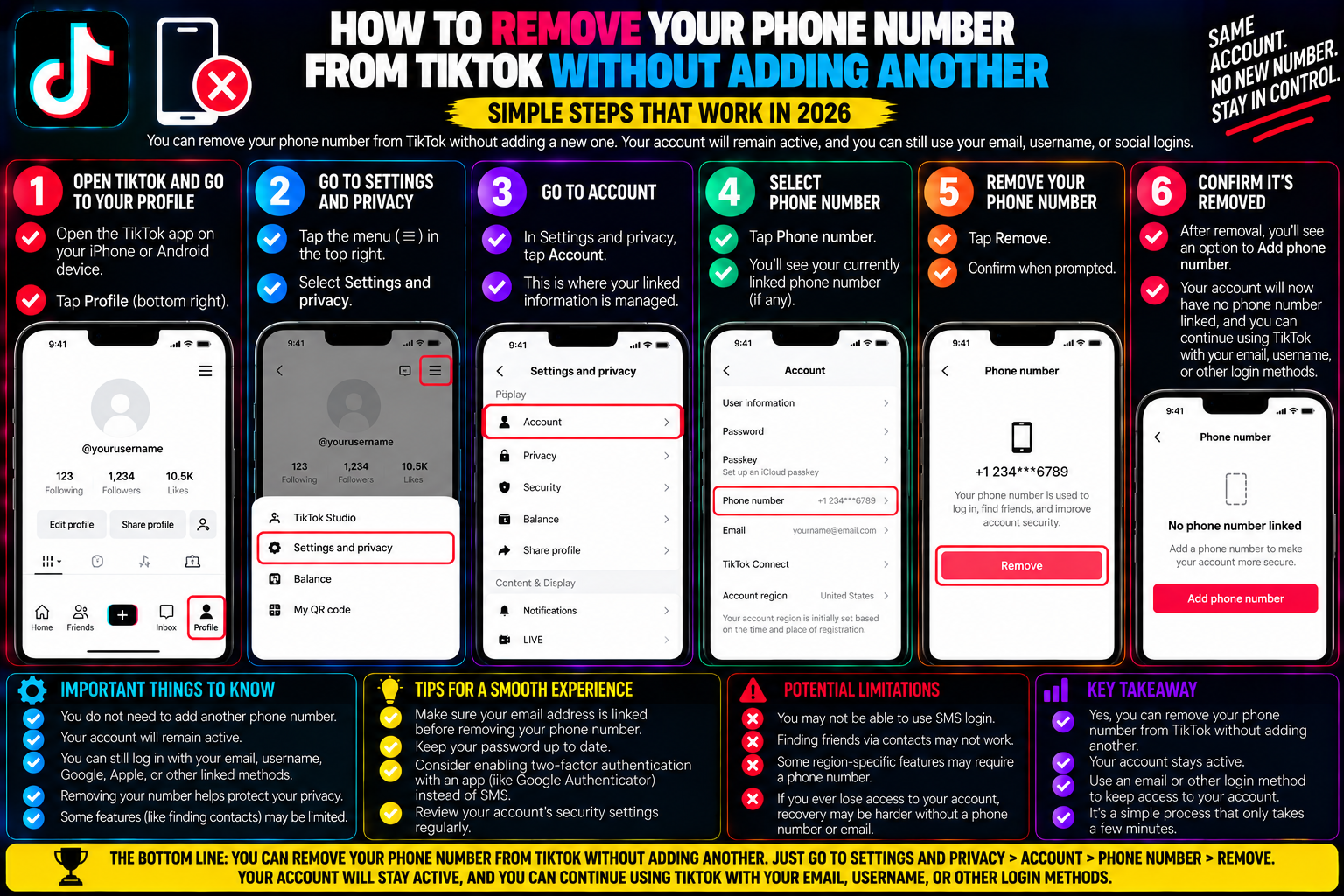
How to Remove Your Phone Number from TikTok Without Adding Another
When setting up a TikTok account, most users instinctively link their mobile phone number during the onboarding sequence. The app frames this as a security essential—a quick way to enable two-factor authentication, recover forgotten passwords, and sync contacts to find real-life friends.
Months or years later, many creators realize the privacy trade-offs of having a personal phone number tied to a public profile. A linked phone number allows TikTok to map your identity across external databases, recommend your account to people in your address book (via the intrusive “Suggest your account to others” feature), and leaves you vulnerable to SIM-swap attacks.
Naturally, users head to their account settings to hit delete, only to discover a frustrating hurdle: the app often demands that you enter a new phone number to replace the old one.
TikTok intentionally designs this flow to maximize phone number retention. However, you are not legally or technically required to keep a cellular number attached to your profile.
By satisfying TikTok’s account authentication requirements and following specific profile-linking workflows, you can completely detach your phone number without substituting a secondary line.
1. Why TikTok Makes It Difficult to Unlink Your Phone
To bypass TikTok’s retention walls, it helps to understand why the platform restricts phone removal in the first place:
+-------------------------------------------------------------+
| TIKTOK'S IDENTITY RETENTION ARCHITECTURE                    |
+-------------------------------------------------------------+
| 1. DATA GRAPH MATCHING:                                     |
| Connects phone numbers to cellular carrier registries,      |
| address books, and third-party advertising identities.       |
+-------------------------------------------------------------+
                             ▲
                             │
+-------------------------------------------------------------+
| 2. BOT AND SPAM MITIGATION:                                 |
| A phone number represents a physical SIM card, making mass  |
| automated bot account generation significantly more costly. |
+-------------------------------------------------------------+
                             ▲
                             │
+-------------------------------------------------------------+
| 3. PRIMARY AUTHENTICATION LOCK:                             |
| If a phone number is your sole recovery channel, TikTok's   |
| security policy forbids deletion to prevent lockouts.       |
+-------------------------------------------------------------+
The Primary Recovery Anchor Rule
TikTok’s security protocol enforces one golden rule: An account must maintain at least one verified primary recovery anchor.
If you registered your profile using an SMS verification code and never added a verified email address or linked third-party OAuth service (like Apple ID or Google), the system flags your phone number as your sole security anchor.
Attempting to delete it in this state causes the interface to block the action, presenting the familiar error: “You must add a new phone number before removing this one.”
2. The Golden Prerequisite: Setting Up Your Secondary Security Anchor
You cannot delete your phone number into a vacuum. Before the “Unlink phone” option becomes clickable, you must establish an alternative verified communication line.
Once an email and static password are confirmed, TikTok’s security engine recognizes that the profile has an active recovery anchor, unlocking the ability to cleanly remove the phone number.
3. The Step-by-Step Workflow: Completely Unlinking Your Number
With your alternative credentials in place, you can proceed with detaching your cellular number directly within the mobile application.
+-------------------------------------------------------------+
| UNLINKING WORKFLOW                                          |
+-------------------------------------------------------------+
| Profile -> Settings and privacy -> Account -> Account info  |
+-------------------------------------------------------------+
                             │
                             ▼
| Tap "Phone number" -> Select "Unlink phone"                 |
+-------------------------------------------------------------+
                             │
                             ▼
| Choose: "Continue to unlink" (Bypass replacement prompt)    |
+-------------------------------------------------------------+
                             │
                             ▼
| Enter final 6-digit SMS verification code to confirm release|
+-------------------------------------------------------------+
               RESULT: Phone field becomes empty / unassigned
Detailed Execution Steps:
-
Open TikTok and go to Settings and privacy $\rightarrow$ Account $\rightarrow$ User information.
-
Tap the line displaying your Phone number.
-
A modal drawer will slide up from the bottom with two choices: Change phone or Unlink phone.
-
Tap Unlink phone.
-
The screen will display a warning: “Unlinking your phone number will remove it as a sign-in and security recovery method.” Tap Continue to unlink.
-
TikTok will send a final 6-digit verification code via SMS to your current number to verify physical possession of the device. Enter the code.
-
The screen will refresh and route you back to User Information.
The Phone number field will now display as blank or state “Add phone number”. Your cellular line is now entirely detached from the profile.
4. Alternative Workarounds: If the Direct Unlink Option Is Missing
In certain geographic jurisdictions or older application builds, the “Unlink phone” button may be omitted, leaving only “Change phone.” If you encounter this restriction, use these alternative workarounds:
Method A: The Desktop Browser Session Override
TikTok’s mobile app aggressively tracks device permissions. Its desktop web portal runs a different client interface that often allows direct field removals:
-
Open a desktop web browser (Chrome, Edge, or Safari) and visit
tiktok.com. -
Log in using your newly verified Email and Password.
-
Click your profile avatar in the upper right corner and select Settings.
-
Under the Account tab, locate your phone number.
-
Click Manage or the trash can icon next to the phone number and confirm the removal via email verification.
Method B: The Temporary VoIP Burner Bridge
If the system insists on a replacement number before releasing your real SIM card line:
-
Never purchase a second physical SIM card.
-
Generate a temporary virtual number using reputable VoIP privacy tools like Google Voice, MySudo, or an eSIM burner utility.
-
Replace your real mobile number with the temporary VoIP number.
-
Once verified, disable the VoIP number or let the temporary lease expire. Your personal mobile number is now protected from TikTok’s contact sync engines.
5. Post-Removal Security Hardening: Protecting Your Account
Removing your phone number eliminates SMS-based identity risks, but it also alters your security footprint. Complete these three housekeeping steps immediately after unlinking:
| Security Setting | Location in App | Recommended Action |
| 2-Step Verification | Settings $\rightarrow$ Security $\rightarrow$ 2-step verification | Switch from SMS to Authenticator App (TOTP) (Google Authenticator, Bitwarden, or 1Password). |
| Sync Contacts | Settings $\rightarrow$ Privacy $\rightarrow$ Sync contacts and Facebook friends | Toggle OFF “Sync contacts” and tap Remove previously synced contacts. |
| Suggest Account | Settings $\rightarrow$ Privacy $\rightarrow$ Suggest your account to others | Toggle OFF “People with your contacts” to prevent appearing in acquaintances’ feeds. |
6. Archiving Master Content While Updating Account Settings
During major account administrative updates—such as changing recovery anchors or updating privacy configurations—many creators take the opportunity to audit their content and secure off-platform backups.
Relying on TikTok as your sole video vault is a risky strategy. If an account is ever locked during a security dispute, local drafts and in-app archives can become inaccessible.
If you have videos uploaded to your feed that you want to back up without burned-in watermarks or lossy screen-recording artifacts:
-
Copy the public link of your published video.
-
Paste the URL into an unwatermarked source extractor like tiksave.org.
-
Download the pristine, uncompressed 1080p source MP4 directly to your computer or external drive.
Keeping a clean, off-platform archive of your video assets ensures your intellectual property remains secure, regardless of future account settings changes or platform policy shifts.
Frequently Asked Questions
Will unlinking my phone number delete my TikTok drafts or videos?
No. Unlinking a phone number is an account-level authentication change handled on ByteDance’s servers. It does not clear your local app sandbox, reset your login state, or delete published videos or offline drafts.
Can I still monetize through the Creator Rewards Program without a phone number?
Yes. TikTok’s Creator Rewards Program and TikTok Shop affiliate payouts require identity verification (such as a tax ID, government-issued identification, and a linked bank account or PayPal), but they do not require a permanent cellular number for payout processing once your email and tax information are verified.
If I unlink my number, will people who have my phone number in their contacts still find me?
No. Once your phone number is removed and you tap “Remove previously synced contacts” under Privacy settings, TikTok permanently severs the database link between your profile ID and your address book entries.