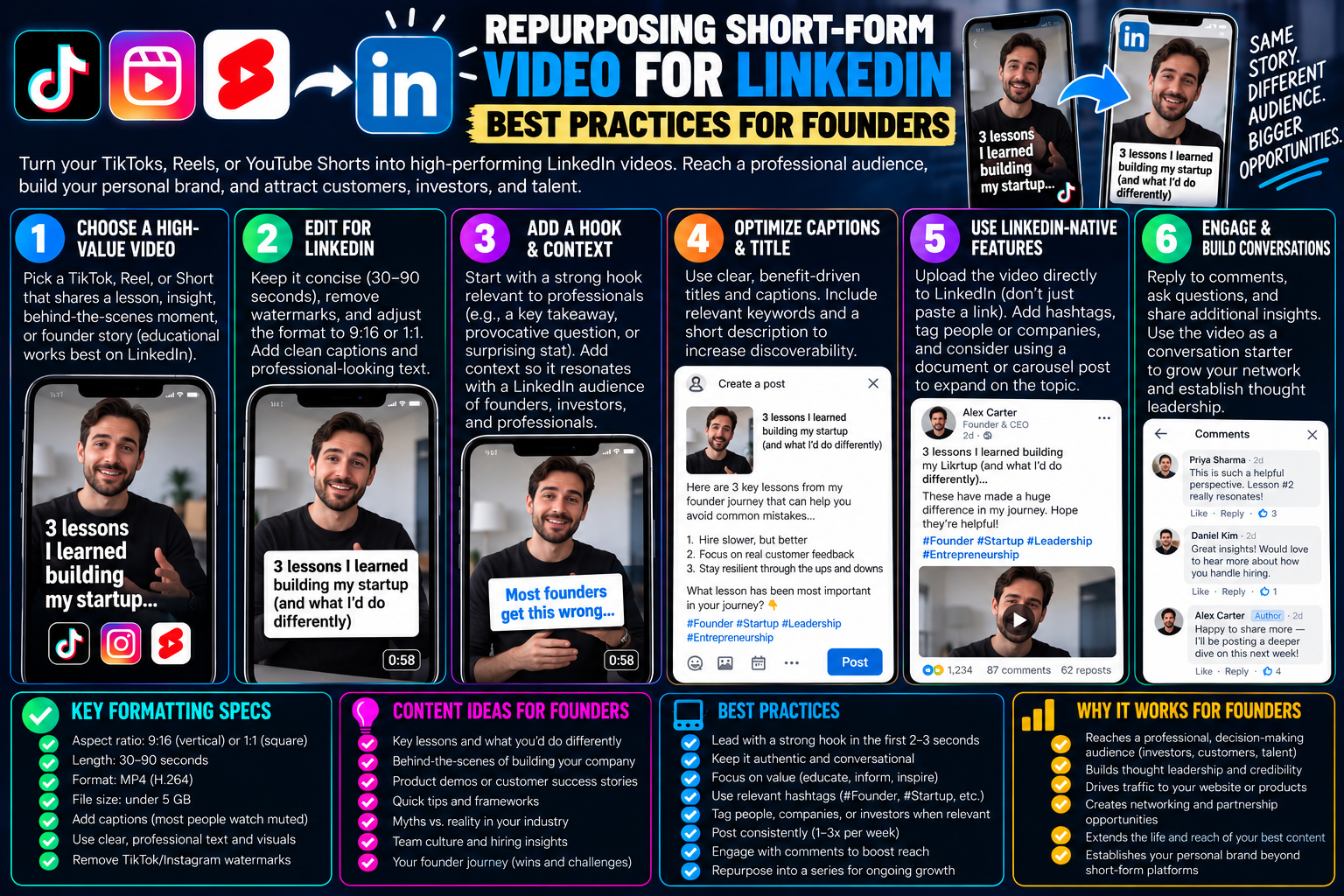
How Founders Can Repurpose Short-Form Videos for LinkedIn
Vertical short-form video is no longer confined to dance challenges or rapid consumer trends. Over the past few years, business platforms have undergone a quiet media transformation. LinkedIn has rolled out dedicated vertical video feeds, giving founders, agency operators, and solo entrepreneurs an underutilized channel to build personal authority, hire talent, and generate enterprise leads.
However, cross-posting a casual TikTok directly onto LinkedIn usually falls flat. Content that thrives on raw comedy or chaotic audio cues can easily alienate corporate buyers, executive peers, and prospective investors.
Repurposing TikTok content for a B2B network requires shifting from entertainment-driven spectacle to value-dense business insight. With the right adjustments in video formatting, watermark elimination, contextual post copy, and topic filtering, short-form video can become a core engine for founder-led growth.
1. The Context Gap: Entertainment vs. Professional Authority
The biggest hurdle founders face when moving video assets between networks is recognizing the difference in audience psychology.
-
TikTok / Consumer Feeds: Viewers seek dopamine, humor, relatability, and ambient distraction. High-energy audio, ironic memes, and trending pop tracks dominate the recommendation stream.
-
LinkedIn Professional Feed: Users scroll during work hours, between meetings, or on desktop workstations while considering their industry standing, professional skills, company goals, or business pain points.
A founder ranting about a bad vendor in an unfiltered TikTok video may seem humorous on consumer social feeds, but without professional framing, that same clip can make an entrepreneur look unhinged or untrustworthy to enterprise partners.
Repurposing does not mean recording completely new footage; it means curating the right topics. The operational post-mortems, software architecture breakdowns, hiring lessons, marketing teardowns, and productivity frameworks that you create for TikTok are prime candidates for LinkedIn.
2. Technical Ingestion: Stripping Competitor Watermarks
Uploading a video that carries the animated TikTok logo or creator tag is fatal to your reach on LinkedIn.
First, LinkedIn’s media feed algorithm prioritizes native, original professional media. Displaying a prominent third-party social media logo flags the upload as a low-effort duplicate. Second, corporate decision-makers perceive third-party platform watermarks as amateurish.
Extracting Clean 1080p Master Files:
-
Locate the educational or founder-focused video on your TikTok profile.
-
Tap Share $\rightarrow$ Copy Link.
-
Use a clean stream extraction tool such as tiksave.org to pull down the direct, watermark-free MP4.
-
Download the original high-bitrate video stream to your computer or mobile storage.
By downloading the unwatermarked stream, you preserve a clean aesthetic that allows the video to look like custom video production created specifically for the LinkedIn audience.
3. Formatting Considerations: Vertical vs. Square vs. Desktop
While mobile LinkedIn users access a full-screen vertical feed, a massive portion of professional browsing happens on desktop monitors and laptops in office environments.
| Factor | Mobile LinkedIn Feed | Desktop Web Feed |
| Primary Aspect Ratio | 9:16 (Full Vertical) | 9:16 (Pillarboxed) or 1:1 (Square) |
| Audio Default | Muted by default (~80% of users) | Strictly Muted (Work environments) |
| Caption Placement | Center-screen safe zones | Flexible; embedded player controls bottom |
| Max File Size | 5 GB | 5 GB |
| Ideal Duration | 45 to 90 seconds | 60 to 120 seconds |
The Power of Hardcoded Captions
On LinkedIn, over 80% of business videos are consumed entirely without sound. In open-plan offices or quiet meeting rooms, executives will rarely turn their device volume up.
If your repurposed TikTok relies solely on spoken voice without embedded, high-contrast captions, your retention rate will collapse in under three seconds. Ensure your clip uses bold, dynamic typography anchored squarely in the vertical center of the frame (between 600px and 1300px on a 1920px canvas) so system player controls or mobile comments do not block key words.
4. The Companion Text: Crafting the Executive Summary
On TikTok, captions are often treated as an afterthought—a quick one-liner and five hashtags. On LinkedIn, the accompanying text is half of the deliverable.
Executives, engineers, and founders often prefer skimming a written post before deciding whether a 60-second video is worth watching. Never publish a bare video link without written context.
+-------------------------------------------------------------+
| THE HOOK (First 2 Lines - Visible Before "See More")        |
| We scaled our SaaS to $50k MRR without spending a dime on  |
| ads. Here is the operational playbook we used:              |
+-------------------------------------------------------------+
| THE BODY (Scannable Bulleted Framework)                     |
| 1. Focused exclusively on programmatic SEO.                 |
| 2. Built free utility calculators for our target niche.     |
| 3. Handled all customer support in public Discord channels. |
|                                                             |
| In the 60-second breakdown below, I explain the exact       |
| pipeline we built to handle our search indexing.            |
+-------------------------------------------------------------+
| THE PROMPT / QUESTION (Drive Meaningful Comments)           |
| What was the single most cost-effective channel for your    |
| startup this year? Let's discuss in the comments.           |
+-------------------------------------------------------------+
The Structure of a High-Converting LinkedIn Post:
-
The Hook (Lines 1–2): Summarize the business lesson, financial milestone, or contrarian perspective to earn the “See more” click.
-
The Written Breakdown: Deliver 3–4 bullet points highlighting the core framework discussed in the video. This delivers immediate value to readers who have sound muted.
-
The Contextual CTA: Invite other professionals to debate, share their experience, or offer alternative methodologies in the comments.
5. Topic Selection: What to Port vs. What to Leave on TikTok
Not every piece of content in your archive belongs on LinkedIn. Use this operational filter before selecting clips for conversion:
Great for LinkedIn:
-
Build in Public: Sharing transparent revenue numbers, customer churn spikes, or post-mortems on failed software rollouts.
-
Workflow & Tool Teardowns: Screen shares illustrating how you automate repetitive internal tasks using modern AI tools or custom scripts.
-
Leadership & Culture: Honest reflections on managing technical teams, hiring mistakes, and establishing engineering standards.
-
Industry Commentary: Fast takes on emerging industry regulations, enterprise mergers, or technological shifts.
Keep on TikTok:
-
Synchronized lip-sync trends or trending dance choreographies.
-
Inside jokes that require deep familiarity with consumer internet subcultures.
-
Overly casual life vlogs that lack a distinct professional takeaway.
Frequently Asked Questions
Should I upload the video directly to LinkedIn or link to an external site?
Always upload natively. LinkedIn’s ranking algorithm penalizes posts that include external outbound links in the primary body, giving them far less feed exposure than native MP4 uploads that keep users inside the platform.
How often should a founder post video on LinkedIn?
Two to three times per week is the sweet spot. Balance your video schedule with written text posts, carousels (PDF documents), and long-form case studies to give your connection base diverse ways to interact with your thoughts.
What should I do if my TikTok video used commercial music?
Strip the commercial pop music out completely. Corporate platforms enforce strict intellectual property standards, and professional audiences find background radio tracks distracting. Use clean voiceover or subtle, copyright-free corporate background tracks instead.